November 21, 2026
Washoi on itch.io
Washoi is on itch.io: a build that plays in the page, starting from a region picker, plus room codes, a Your account step for your key, a new Home page in the lobby and native client 1.0.1. Inside Washoi 1.0.3.
Washoi on itch.io
Washiki Washoi! is on itch.io. A day after 1.0, the game got a second home: Washoi's page on itch.io (opens in a new tab), where it plays right in the page, free, like it does on washoi.net. Same game, same servers, same lobbies.
If you found Washoi through itch.io: hi, and welcome! There's a release announcement in itch.io's forums (opens in a new tab) too, and the Discord (opens in a new tab) is the place to come say hello.
How the itch.io Build Works
It opens on a region picker. That's washoi.net's Play launcher, drawn the way the native client draws it: the dot-matrix world, a pin for each region, its ping and a Nearest tag. Pick a region and you're in its lobby. The build carries no game data of its own; it loads that from the region's server.
itch.io's full-window mode has no way back to the game's page, so the lobby has a ✕ plate that does it. 1.0.2 moved it to the top-left corner, where the demo player keeps its own ✕.
Copying works inside itch.io's frame as well: your account key, room codes and links all copy, even where the browser blocks the usual way of doing it.
Your Account Key
The itch.io build never stores your account key. It signs in with a login token for each region instead, swapped for a fresh one at every login. Signing in with the key itself signs out the account's other itch.io sessions on that server.
That makes the key worth keeping somewhere safe, so the welcome guide has a new last step, Your account. It shows your key, blurred until you ask, with buttons to copy it or save it as a file. Every client has the step; on itch.io it shows in the session that made or pasted the key.
Room Codes
Every room shows its code now, something like eu:3fa9c2d1, with Copy code beside the room link. Join lobby via invite, at the foot of the Play page, takes a code or a room link from any region; a room in another region switches region first. And when someone names a room in chat, the message gets a Join key. The itch.io build sticks to codes and shows no links.
A Home in the Lobby
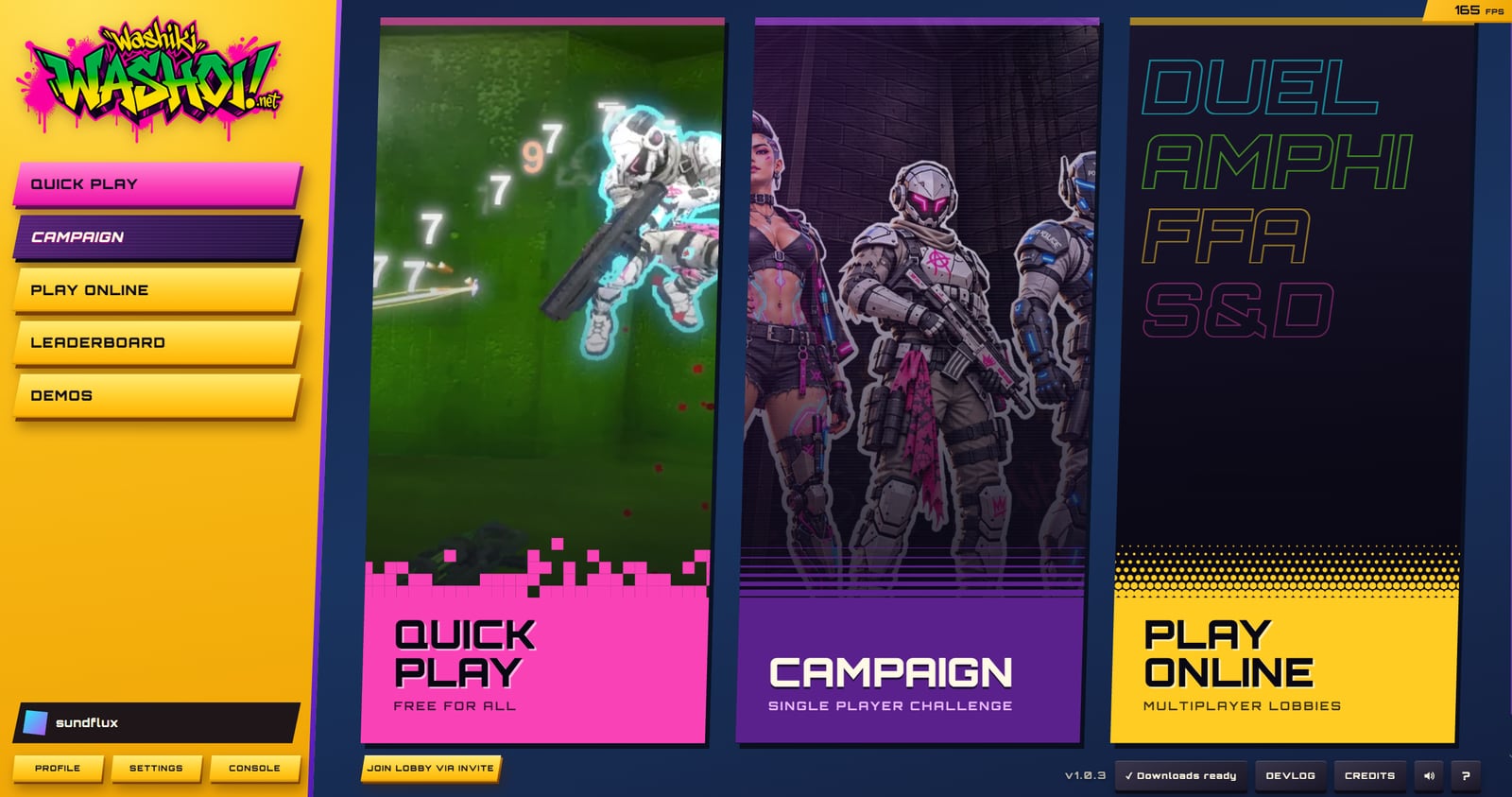
1.0.3 opens the lobby on Home. Three full-height cards:
- Quick play is Free For All, over ten match shots that drift slowly and fade from one to the next.
- Campaign has the campaign banner's squad and street, drifting in its purple stripes.
- Play online lists the four modes in their colours.
Each card does exactly what its rail key does. The card under the pointer widens, lifts and glows, and in a narrow window they stack. Each card's text sits on its colour, which breaks up into the art: pink blocks, purple lines, a gold halftone. The Washoi logo at the top of the rail brings you back Home, and the lobby's footer now shows the version number before the downloads indicator.
Native Client 1.0.1
The native client for Windows, macOS and Linux is at 1.0.1, caught up with the game's 1.0.3. It has the Home page, and a finished match returns there. It has Join lobby via invite and room codes; a room in another region restarts the lobby in that region and joins the room. And the welcome guide has the Your account step, to copy or save your key.
It also keeps one account key per region now. Each region has its own players, and with one shared key, joining a room in another region could sign in there with the wrong key and make a new player. The key from earlier versions goes to the region you launched last.
The itch.io-only parts (the region picker, the ✕ plate and the login tokens) stay in the itch.io build. Grab 1.0.1 from the Downloads page.